
The Mass Return table is designed for fast intake of equipment returning from sites, especially when items come back from multiple projects at once.
Where to find
Go to the Warehouse section and open the Mass Return tab.
How the table works
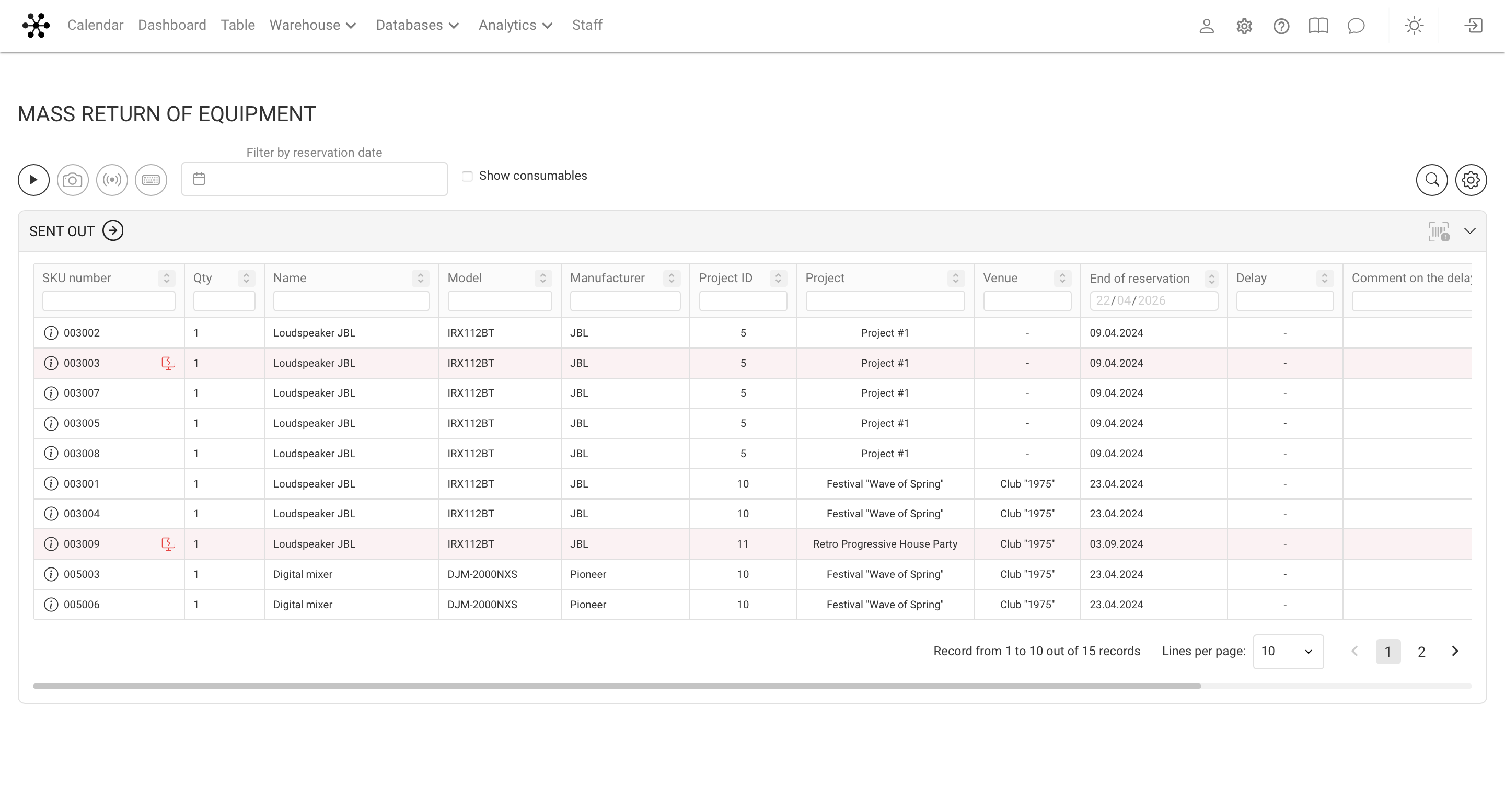
Each row in the table represents a specific SKU (individual unit of equipment).
The table can include the following fields:
- SKU
- Name
- Model
- Brand
- Project ID
- Project name
- Location
- Booking end date
- Delay
- Delay comment
- Shipment date
- Responsible
You can customize which columns are displayed and in what order.
Main actions
1. Return to warehouse
Select one or multiple SKUs and set the status to Accepted — the equipment is immediately returned to the warehouse.
2. Change item status
Additional actions are available:
- mark as Lost
- mark as Faulty
- send to Diagnostics
Lost items are written off later from the Catalog (Lost section).
Input methods
All actions are applied instantly, without additional confirmation.
Available input methods:
- barcode scanning
- RFID
- camera scanning
- manual input
This allows the table to be used as the main intake tool in the warehouse.
Filters and customization
- Each column has its own filter
- Filters can be combined across multiple parameters
- The table view is customizable (gear icon):
- select visible columns
- change their order
This makes it easy to adapt the interface to different workflows.
Relation to Overdue Returns
The Mass Return table shows:
- all SKUs currently out of the warehouse
- including overdue ones
The Overdue Returns table is essentially the same data with a filter applied for delayed items only.
When to use
This table is especially useful when:
- equipment returns from multiple projects at once
- a truck brings items from different locations
- you need to process a large number of SKUs quickly
If items are returned from a single project, it is usually more convenient to process them within that project.
If multiple projects are involved, Mass Return significantly speeds up the workflow.
Key details
- Works on the level of individual SKUs, not entries
- All actions are applied instantly
- Stock levels and shortages update immediately
- If a SKU is returned before the booking end date, it becomes available for other projects right away
Using the Mass Return table helps speed up warehouse operations and maintain accurate equipment tracking.