
The role settings are located in:
Global settings → Project
Important: this block is not used to create or edit roles.
Roles themselves are created in:
Employees database → Options → Roles
In the global settings, you configure:
- which roles will be displayed by default in new projects
- which employees will be automatically assigned to these roles
General logic
Roles in a project are responsible persons.
For example:
- Foreman
- Manager
- Technical director
These roles are used:
- in the Information tab of the project
- in the Project management block inside Planning
- in documents
- in analytics and financial report filters
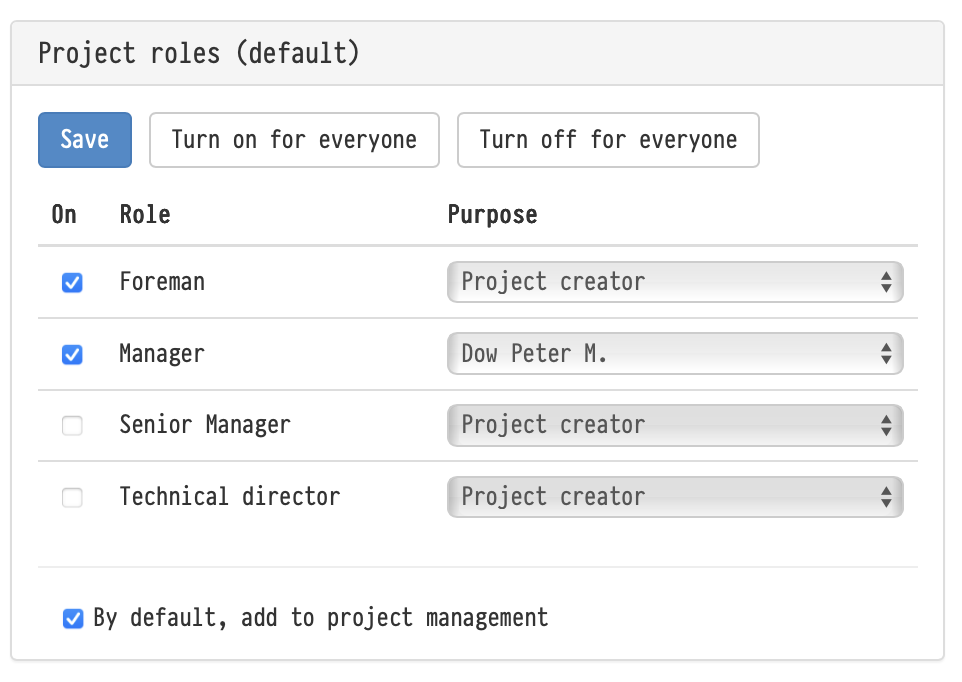
Role display settings
This block displays all roles created in the Staff database.
Each role includes:
- an enable checkbox
- a default employee selector
Role checkbox
If the checkbox is enabled:
- the role will automatically appear in all new projects
If the checkbox is disabled:
- the role will not be added by default
- but it can still be manually added inside the project
Important:
- all roles can be disabled
- in this case, new projects will be created without responsible persons
Default employee
For each role, you can:
- select a specific employee
- or choose the project creator
When a new project is created, the selected employee will automatically be assigned to the corresponding role.
Important:
- a role cannot exist without an assigned employee
Role order
The order of roles inside projects is determined by the order in:
Staff database → Options → Roles
The order cannot be changed in the global settings.
Automatically adding roles to Planning
At the bottom of the settings block there is an additional checkbox responsible for automatically adding responsible persons to:
Planning → Project management
If the option is enabled:
- all roles from the Information tab are automatically added to Project management
- if a new role with an assigned employee is later added to the project, it will also automatically appear in Planning
Important:
- only the employee is added automatically
- rates and percentages need to be configured manually
- by default, the “fixed amount” option will be selected for new entries
Applying the settings
Changes apply:
- only to new projects
- after saving the settings
Existing projects are not modified.
Key concepts
Roles, Project, Responsible persons, Project management, Planning, Staff, Global settings, Project information, Manager, Foreman